 Genius Asian
 Part 2, Google Voice Shutdown 3rd Party VoIP Interface
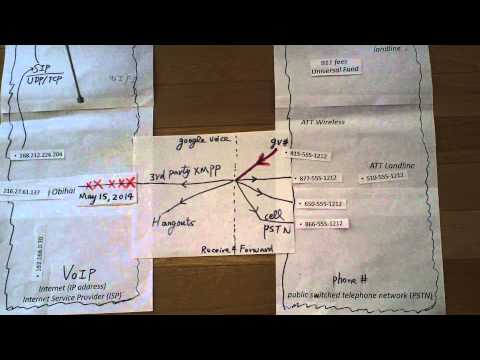
Part 2, Google Voice Shutdown 3rd Party VoIP Interface
Key Takeaways
- This follow-up video provides deeper comparison of alternative VoIP solutions after Google Voice shut down its XMPP interface
- Multiple options exist for maintaining free or near-free phone service
- Each alternative has different tradeoffs in terms of cost, convenience, and technical complexity
- The goal remains achieving free or very cheap voice service to replace what Google Voice previously offered
- Technical users have more options but even non-technical users can find affordable solutions
Continuing the Search for Free Phone Service
After Google Voice announced the shutdown of its XMPP interface for third-party devices, users who had built their phone setup around this free service needed alternatives. Part 1 of this series covered the big picture — what VoIP is, why the shutdown happened, and the broad categories of solutions available. This Part 2 goes deeper into comparing specific alternatives.
The fundamental question remains the same: how do you make and receive phone calls for free or nearly free, now that the convenient Google Voice integration with hardware devices like Obihai and apps like GrooVeIP no longer works?
Comparing the Alternatives in Detail
Browser-Based Calling: Google Voice still supports free calling through a web browser. The voice quality is good and the service is reliable. The limitation is obvious: you need to be at a computer with a browser open. For incoming calls, you can set Google Voice to ring your email or a browser tab, but this is far less convenient than a phone ringing on your desk.
Callcentric for Incoming: Callcentric offers free incoming call reception on a DID (Direct Inward Dial) number. You can receive calls on a SIP phone or ATA device at no monthly cost. Outgoing calls require a paid plan or credits. This makes Callcentric an excellent complement to a free outgoing solution.
Localphone for Outgoing: Localphone offers remarkable value — $1.60 per month for 800 minutes of US and Canada calling, or $5 per month for 5,000 minutes. For most households, even the basic plan provides more than enough minutes. The per-minute cost works out to fractions of a cent.
Self-Hosted Solutions: For technically inclined users, running your own SIP server (using Asterisk, FreeSwitch, or SIPSorcery) opens up the most flexibility. You can configure dial-back solutions where the system initiates calls to both parties and connects them, effectively making outgoing calls free through incoming call credits. The tradeoff is significant technical complexity in setup and maintenance.
Combination Approaches: The most practical solution for most users combines two or more services. For example: Callcentric for free incoming, Localphone for cheap outgoing, and Google Voice through a browser as a backup. Total monthly cost: under $2.
Cost Comparison
To put the savings in perspective, consider what these alternatives replace. A traditional landline costs $30-60 per month. A basic cell phone plan costs $30-100 per month. Even the most expensive VoIP alternative discussed here costs $5 per month. Over a year, the savings can exceed $500-1,000 depending on what you were previously paying.
The Evolution of Free Communication
The Google Voice XMPP shutdown was a reminder that free services from large companies can change or disappear at any time. Building your communication setup entirely on one company’s free offering creates vulnerability. A diversified approach using multiple services provides resilience.
Setting Up Your Own Solution
For viewers interested in implementing their own cost-effective phone setup, the practical steps are straightforward. Start by choosing a SIP provider for incoming calls (Callcentric is a reliable option for free incoming). Register your existing number or get a new one. Set up a SIP client on your phone or configure an ATA device for a traditional handset. Add a low-cost outgoing service like Localphone for the handful of calls you make from a non-mobile device. Test the setup thoroughly before canceling any existing phone service. The entire configuration process takes an afternoon, and the monthly savings begin immediately. Most importantly, document your setup so you can recreate it if any single component changes or fails in the future.
For more technology guides, see internet access tips when traveling to Europe and preparing for Europe travel.